REBEAN tutorial
This web server incorporates REBEAN, mi-faser and MeBiPred for functional annotation of shotgun metagenomic sequencing reads. REBEAN is a DNA language model for enzymatic annotation of metagenomic sequencing reads. REBEAN classifies individual reads into Enzyme Commission (EC) level 1 classes. mi-faser complements REBEAN by providing alignment-based EC annotation of reads, translating them and aligning them against a curated enzyme database. MeBiPred predicts the metal-binding potential of the peptides translated from these reads, consolidated to individual reads. The web server accepts DNA sequences in FASTQ and FASTA format and has been tested on shotgun metagenomic samples.
1. The submission page
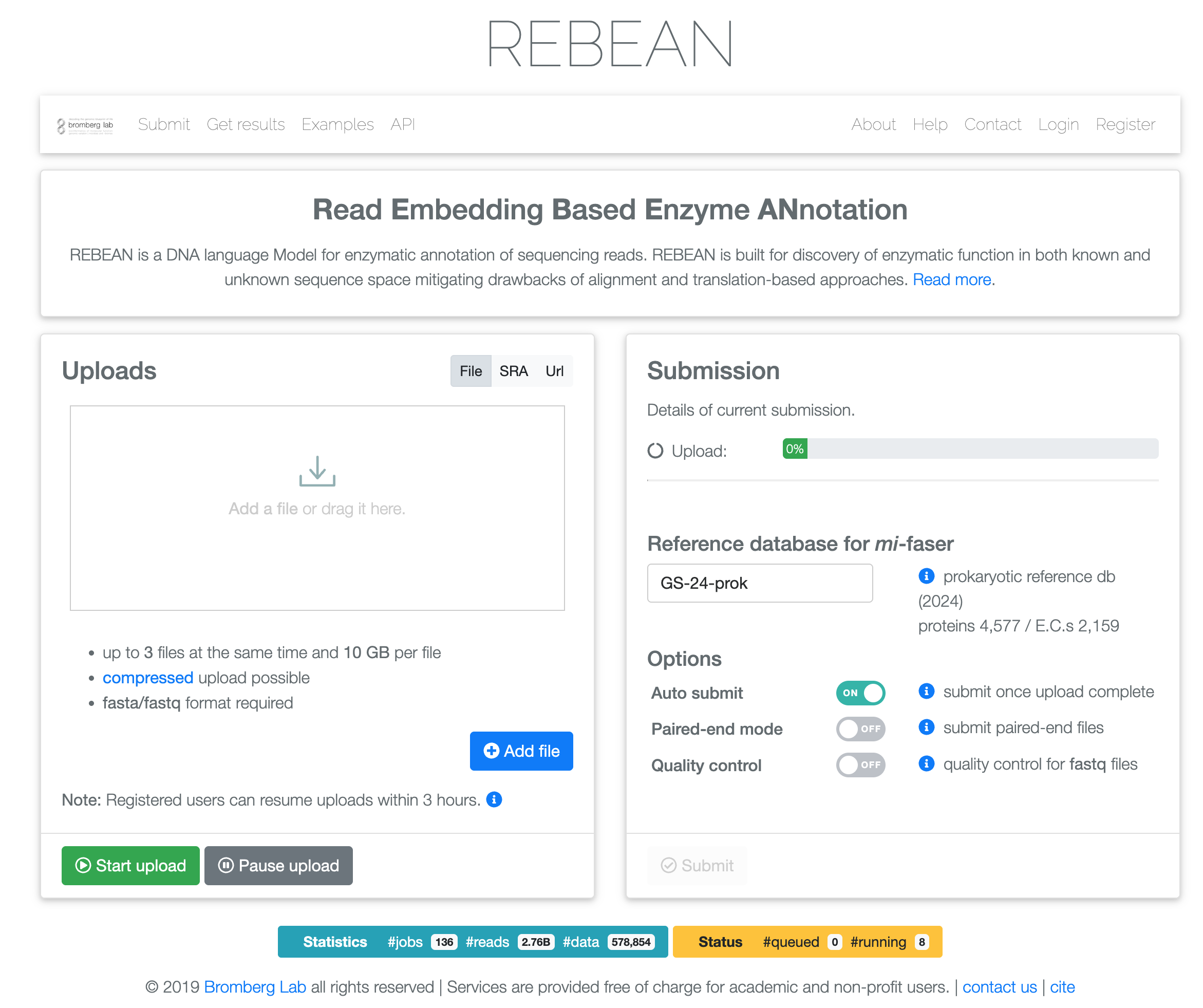
The Uploads panel, on the left, selects the input type and transfers the reads. The Submission panel, on the right, specifies the reference database and the run options. Submission therefore proceeds in two stages: the upload is started in the left panel, and the job is queued in the right panel. Enabling Auto submit combines the two stages.
 1
2
3
4
5
1
2
3
4
5
- Navigation: Submit, Get results, Examples and API, with Login and Register on the right.
- Uploads: selects the input route and transfers the reads.
- Submission: specifies the mi-faser reference database and the run options.
- Start upload: begins the transfer. Pause upload suspends it.
- Submit: queues the job. Inactive until an upload has completed.
2. Choosing an input
Raw metagenomic reads are accepted through three input routes:
- File: direct upload of DNA reads from metagenomic sequencing, as single-end or paired-end FASTA/FASTQ files.
- SRA: automated retrieval from the Sequence Read Archive by run accession. Up to
ten accession identifiers may be submitted at a time. The Examples page provides three
annotated runs:
ERR9456921(saltern metagenome),ERR2834316(hydrothermal vent metagenome) andSRR5788104(marine metagenome). - URL: direct download from an external address.
Note: the SRA and URL routes are restricted to authenticated users. Registration is free of charge. An account additionally provides access to the complete record of previous jobs, monitoring of jobs in progress, and resumption of an interrupted upload within three hours.
Examples: pre-executed submissions are stored on the server and demonstrate both the accepted input and the output retrieved from it. They are available at https://services.bromberglab.org/rebean/results/example.
Resource use: retrieving input data and annotating it are time-consuming and computationally intensive. The service is provided free of charge, and users are asked to be considerate in their use of it.
 1
2
3
4
5
6
1
2
3
4
5
6
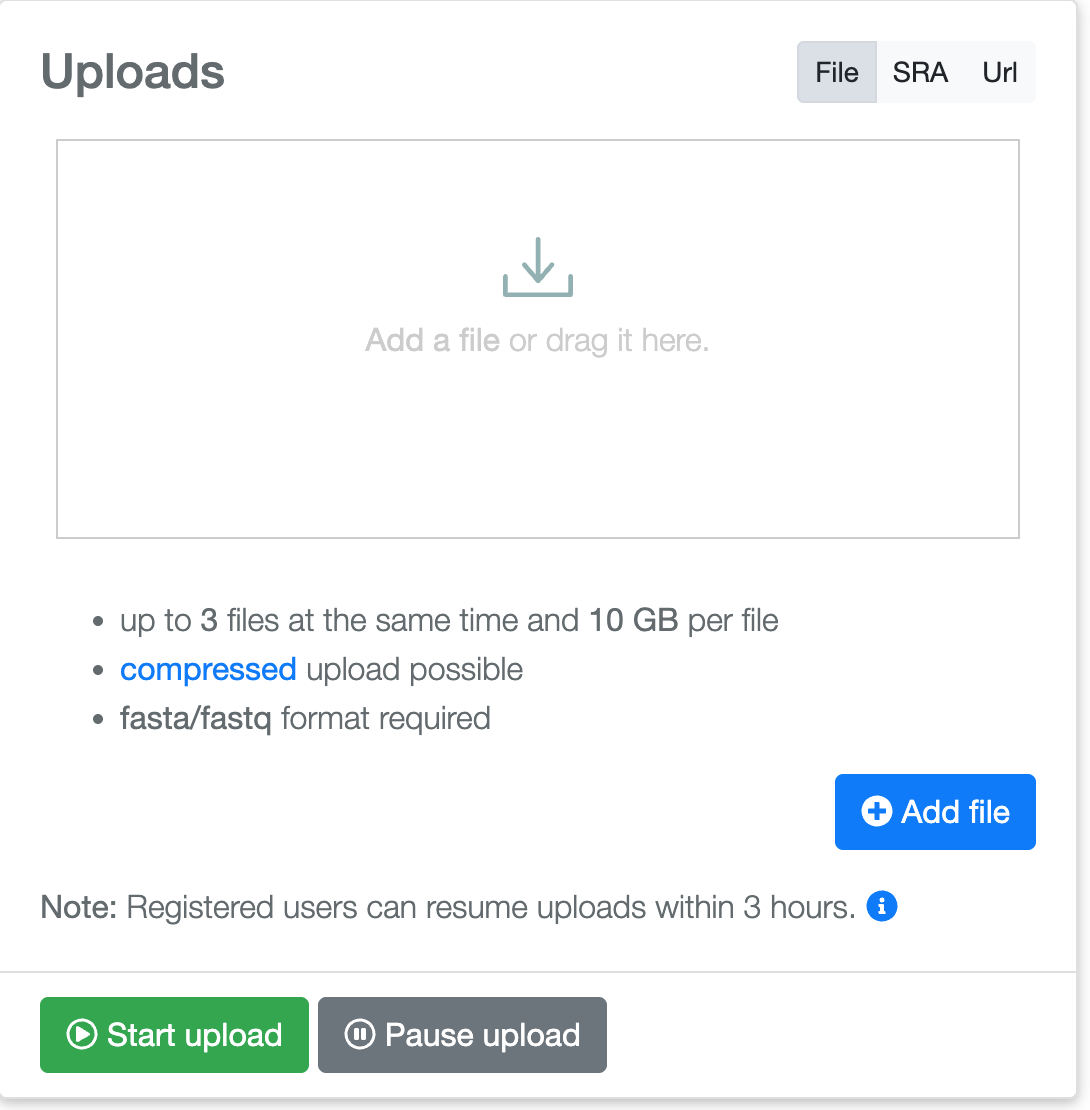
- File / SRA / Url: the input route. SRA and Url require an account.
- Drop zone: reads may be dragged here, or selected with Add file.
- Limits: up to three files at a time, 10 GB each, in FASTA or FASTQ format, optionally compressed.
- Add file: opens the file picker.
- Resume: authenticated users may resume an upload within three hours.
- Start / Pause upload: begins or suspends the transfer.
3. Setting the options
Reference database for mi-faser
mi-faser is an alignment-based enzyme class annotation tool, also available independently at https://services.bromberglab.org/mifaser/. Annotation is performed against a gold-standard reference, which must therefore be specified. Three databases of experimentally annotated enzymes are available, covering bacteria, prokaryotes, and all domains of life. The size of the selected database is reported in the panel.
| Database | Coverage | Proteins | E.C. numbers |
|---|---|---|---|
| GS-24-bac | bacterial reference db (2024) | 4,076 | 2,021 |
| GS-24-prok | prokaryotic reference db (2024) | 4,577 | 2,159 |
| GS-24-all | reference db (2024), all domains | 12,491 | 3,686 |
Run options
- Auto submit: the job is queued as soon as the upload completes.
- Paired-end mode experimental: the uploaded files are treated as mate pairs. This option is in beta and its output should be interpreted with caution.
- Quality control: FASTQ input is filtered prior to annotation, removing low-quality reads (Phred score < 20), adapters, and sequences shorter than 40 bp.
 1
2
3
4
5
6
1
2
3
4
5
6
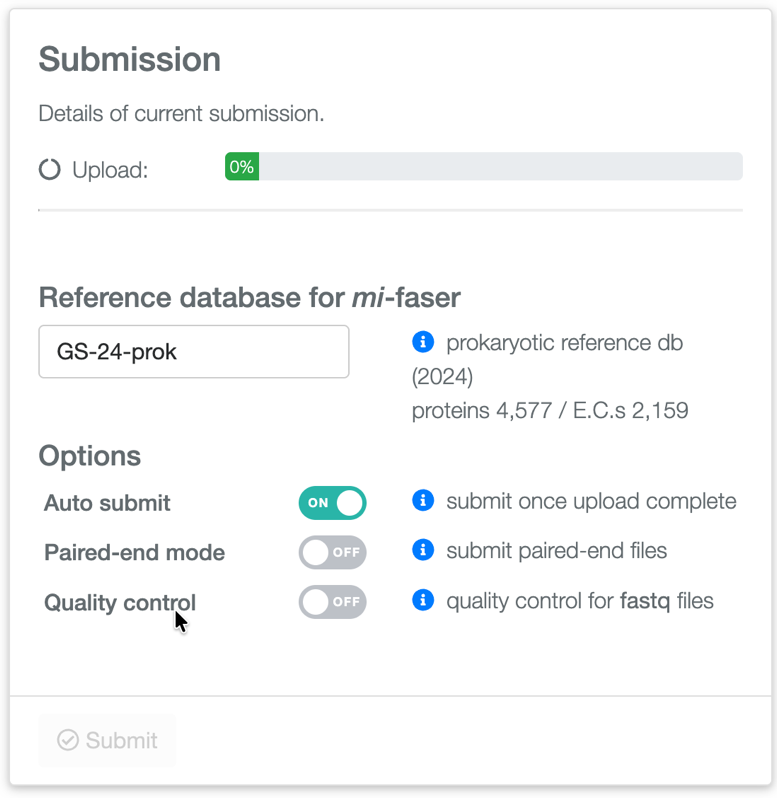
- Upload progress: tracks the transfer started in the Uploads panel.
- Reference database: bacteria, prokaryotes or all, with the size reported alongside.
- Auto submit: queues the job once the upload completes.
- Paired-end mode experimental: submits the uploaded files as mate pairs.
- Quality control: filters FASTQ reads prior to annotation.
- Submit: inactive until an upload has completed.
4. Retrieving a job
If an email address is provided at submission, two notifications are sent: one when the job is queued and one when it completes. Jobs are retrieved from the Get results page. A job identifier returns the status or the results of that single job, whereas an email address returns all jobs associated with that address. Authenticated users may access the same list at https://services.bromberglab.org/rebean/myresults.
 1
2
3
1
2
3
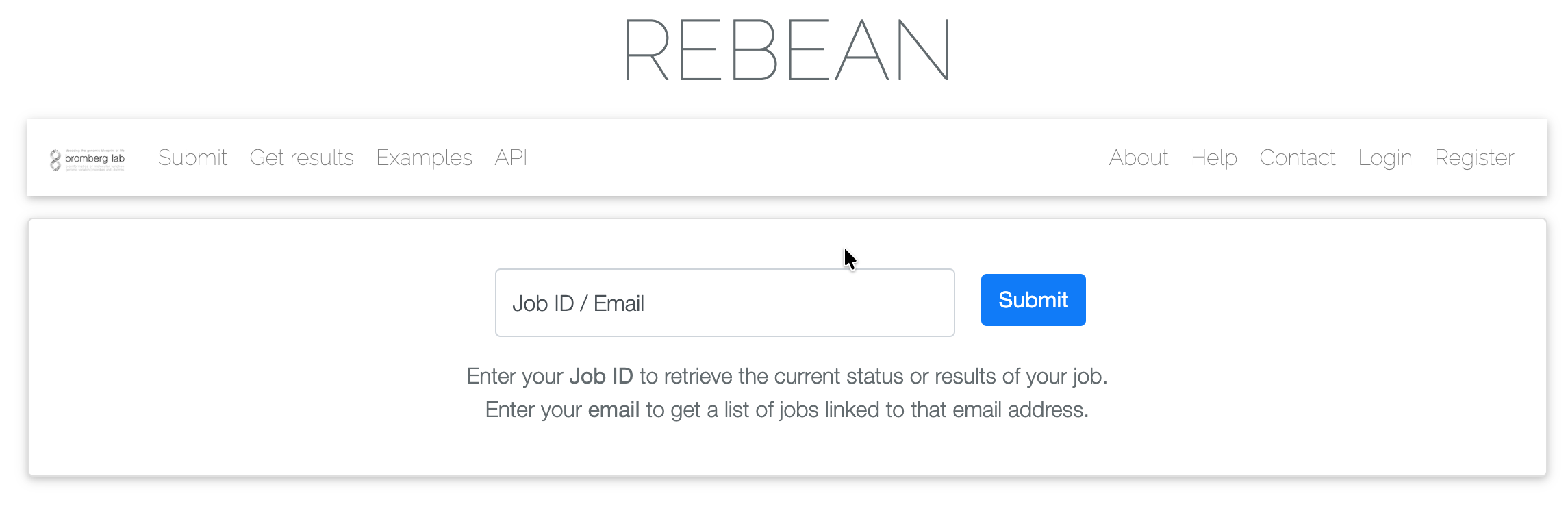
https://services.bromberglab.org/rebean/results.- Get results: accessible from the navigation bar on every page.
- Job ID / Email: a single field accepting either a job identifier or an email address.
- Submit: opens the results page, or the list of jobs.
5. Reading the results
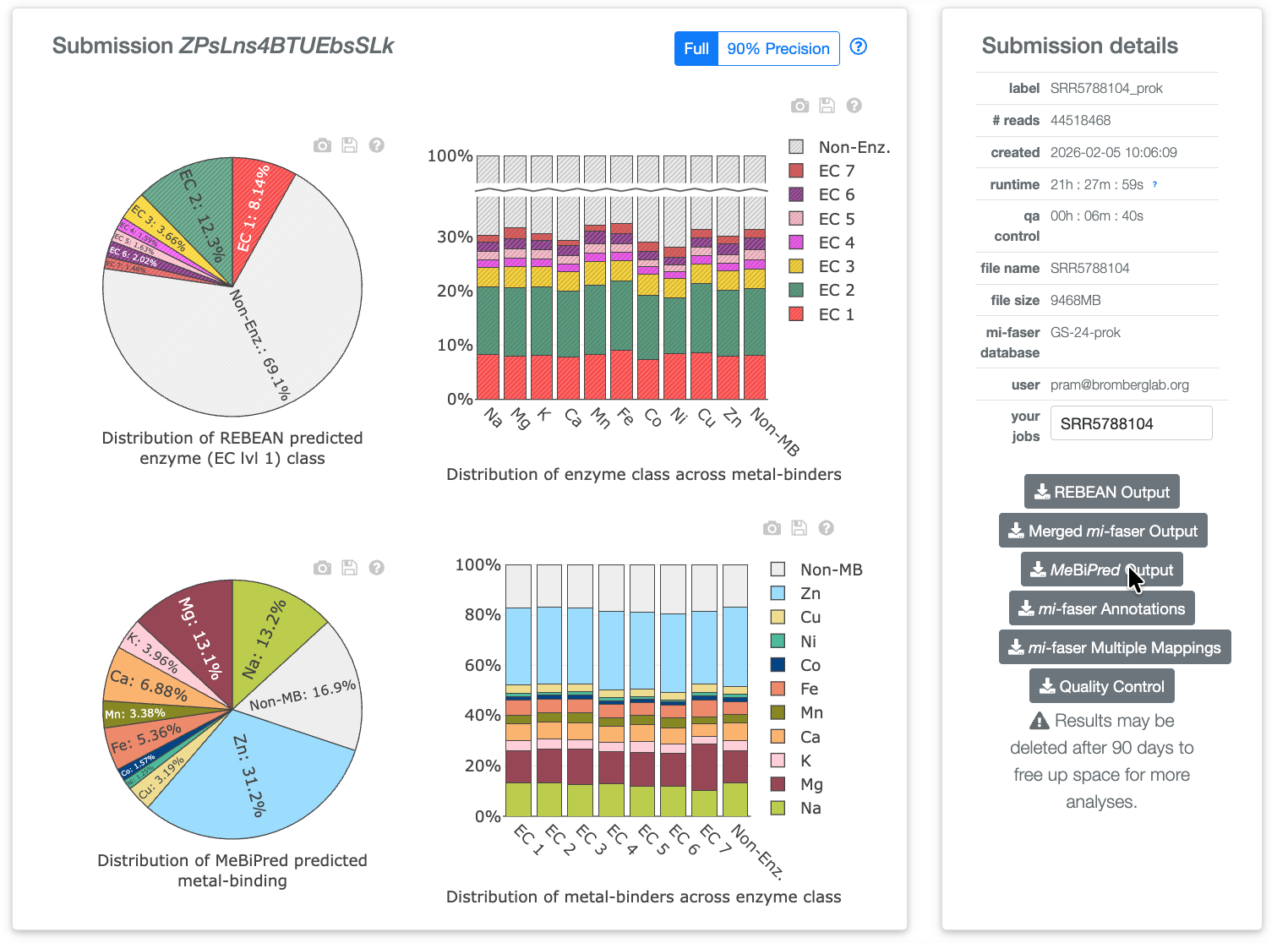
For each read, REBEAN reports a predicted enzyme class and mi-faser reports an alignment-based annotation, while MeBiPred reports the metal-binding potential of the peptide sequence translated from that read. These per-read outputs are provided for download. The results page presents the consolidated distribution over the sample: the partition across the seven enzyme classes, the partition across metals, and the intersection of the two.
The page comprises two columns. The left column contains the interactive summary. The right column, Submission details, lists the job metadata and the download links. A unique identifier is assigned to every submission in addition to the job name supplied by the user.
Pre-executed example results are stored on the server and may be inspected without submitting a job, at https://services.bromberglab.org/rebean/results/example.
 1
2
3
4
5
6
7
8
9
1
2
3
4
5
6
7
8
9
ZPsLns4BTUEbsSLk: 44.5 M reads from SRA run SRR5788104, annotated against the
prokaryotic reference.- Submission identifier: the unique identifier, beside the job label.
- Full / 90% Precision: selects between the two screening modes for all plots and the table.
- Plot toolbar: exports the figure, saves the plotted values, or opens a description of the plot.
- Enzyme class: the REBEAN partition at EC level 1, with non-enzymatic reads as the remainder.
- Class across metals: one bar per metal, partitioned by enzyme class.
- Metal binding: the MeBiPred partition across ten metals, with non-binders as Non-MB.
- Metals across class: one bar per EC class, partitioned by metal.
- Submission details: label, read count, timestamps, runtime, file name and size, reference database and account.
- Downloads: the six raw per-read outputs, retained for 90 days.
Full and 90% precision modes
The toggle above the plots selects between two screenings of the same predictions. Full reports all REBEAN calls. 90% Precision retains only calls exceeding a high-precision threshold, defined separately for each EC class and listed on the Help page. The gain in precision is obtained at the cost of recall, so fewer reads are classified as enzymatic.
The four plots
The four panels present two views of a single joint distribution of enzyme class against metal-binding potential, one in each direction. The pie charts give the marginal distributions; the stacked bar charts give the conditional distributions. Hovering over a wedge or a segment displays the underlying counts.
6. The master table
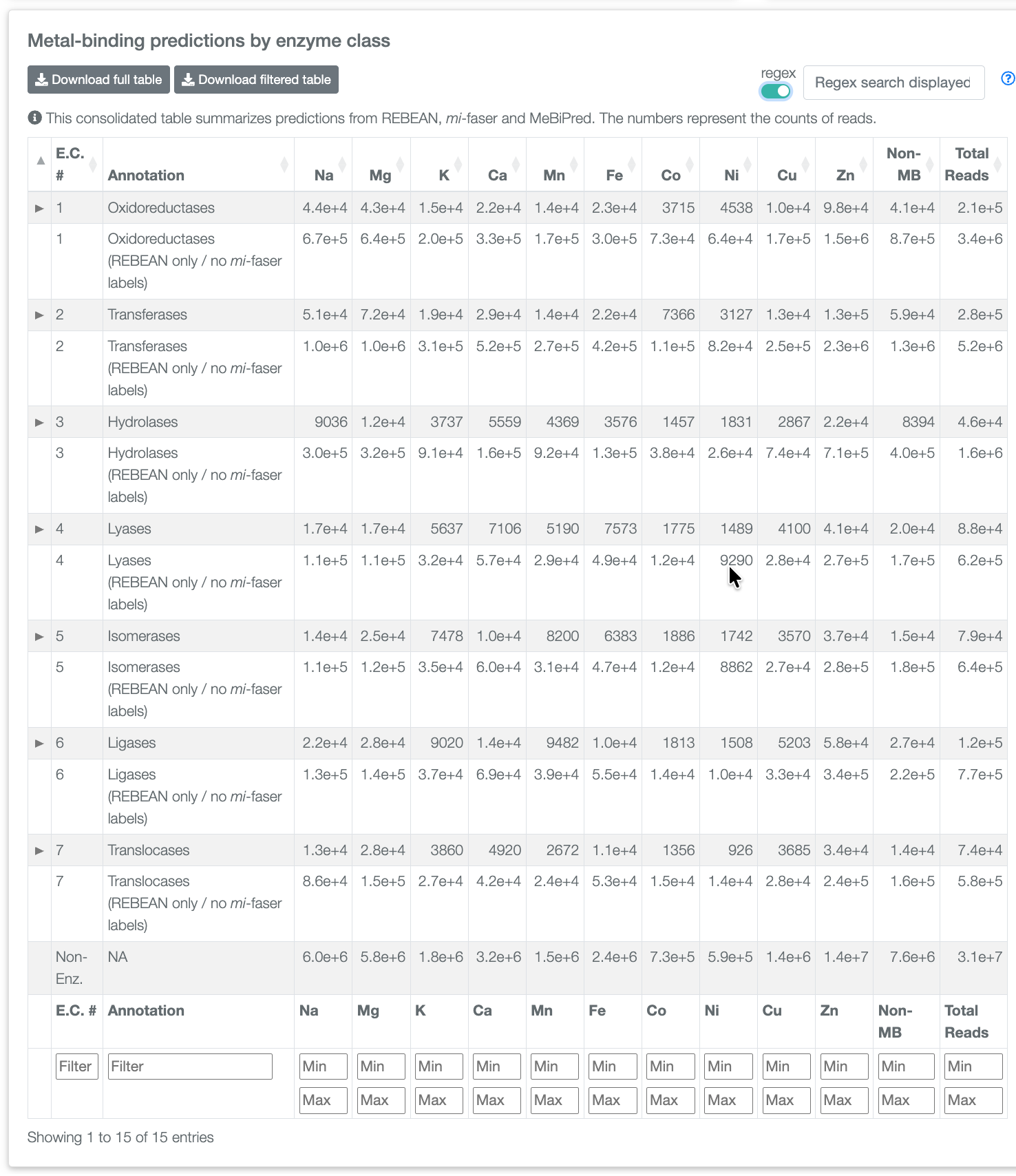
A dynamic table below the plots cross-tabulates REBEAN read counts, mi-faser annotations and MeBiPred metal-binding predictions for the sample. Each cell contains a read count. REBEAN predicts at EC level 1, so each class occupies a single top-level row; the arrow in the left-most column expands that row to the mi-faser annotation counts at subsequent levels. Rows labelled REBEAN only / no mi-faser labels contain reads assigned to a class by REBEAN that mi-faser could not annotate. These typically constitute the larger fraction, and represent the portion that an alignment-based method alone would not recover.
 1
2
3
4
5
6
7
8
9
1
2
3
4
5
6
7
8
9
- Download full / filtered table: exports the complete table, or only the filtered rows.
- Search: free-text search over the displayed rows. The regex switch enables regular-expression matching.
- Expand arrow: expands a row to the mi-faser counts at deeper EC levels.
- E.C. # / Annotation: the class number and name, both sortable and filterable.
- REBEAN only: reads classified by REBEAN but left unlabelled by mi-faser.
- Metal columns: read counts per metal, Na to Zn, from MeBiPred.
- Non-MB / Total Reads: reads predicted to bind no metal, and the row total.
- Non-Enz.: reads not classified as enzymatic, partitioned by metal.
- Filter footer: text filters on the first two columns, minimum and maximum bounds on the count columns.
7. Reference
Enzyme classes
REBEAN predicts at EC level 1. Swatches correspond to the colours used in the result plots.
| Class | Name | Reaction |
|---|---|---|
| EC 1 | Oxidoreductases | Oxidation and reduction |
| EC 2 | Transferases | Transfer of a functional group |
| EC 3 | Hydrolases | Hydrolytic bond cleavage |
| EC 4 | Lyases | Non-hydrolytic bond cleavage |
| EC 5 | Isomerases | Intramolecular rearrangement |
| EC 6 | Ligases | Bond formation coupled to ATP hydrolysis |
| EC 7 | Translocases | Transport across a membrane |
| n/a | Non-Enz. | Not predicted to be enzymatic |
Metals
MeBiPred covers ten metals. Reads whose encoded protein is predicted to bind none of them are grouped as Non-MB. Swatches and ordering correspond to the result plots and the master table.
| Metal | Name |
|---|---|
| Na | sodium |
| Mg | magnesium |
| K | potassium |
| Ca | calcium |
| Mn | manganese |
| Fe | iron |
| Co | cobalt |
| Ni | nickel |
| Cu | copper |
| Zn | zinc |
| Non-MB | no metal predicted |
Downloads
| Button | Contents |
|---|---|
| REBEAN Output | REBEAN enzyme class predictions, per read |
| Merged mi-faser Output | mi-faser results consolidated across the submission |
| MeBiPred Output | Metal-binding predictions for the translated peptides |
| mi-faser Annotations | Per-read mi-faser E.C. annotations |
| mi-faser Multiple Mappings | Reads matching more than one reference annotation |
| Quality Control | Report from the quality-control step |
Retention: outputs from successful jobs are retained for 90 days and are subsequently deleted. Files intended for further use should be downloaded before that point.
Screenshots show the example submission ZPsLns4BTUEbsSLk. The values
reported are those of that run.